CLAWPOD ENGINEERING
Getting Started with ClawPod Cloud: Your First Agent and Conversation
Follow the beginner path from signup or invitation through AI credentials, first-Agent setup, a dedicated Chat Room, and a verified first response.
ClawPod Cloud is a place where teams create purpose-built AI Agents and manage conversations and work together. An Agent is more than a chat window. It is a working unit configured with a role, model, credential, and baseline instructions.
For your first session, do not try to master every setting. Aim for one small, observable success: confirm your account and organization, prepare an AI connection, create an Agent with a narrow role, and complete one request in a dedicated Chat Room.
flowchart TD
  S{How did you start?}
  S -->|Direct signup and new workspace| O[Verify the account<br/>check onboarding]
  S -->|Invitation to an organization| I[Use the invited email<br/>confirm organization access]
  O --> C[Prepare an AI credential<br/>confirm permission]
  I --> C
  C --> A[Create a first Agent<br/>with one clear role]
  A --> R[Open a dedicated Room<br/>with only that Agent]
  R --> P[Send a small request]
  P --> V[Verify the response<br/>against completion criteria]
  linkStyle default fill:none,stroke:#64748b,stroke-width:1.5px
1. Identify your starting path
The two paths look different at first. They converge when you confirm a credential and begin working with an Agent.
If you signed up and created a new workspace
Use Sign up in the Portal, enter the requested account and workspace details, and verify the six-digit code sent to your email. Direct signup may lead to an administrator-approval waiting screen after verification.
If /onboarding opens after approval, you are in the initial setup flow for a new workspace. Provide the requested company information and reference URLs, review the proposed organization, then connect an LLM provider and API key so the initial Agents can be prepared. This onboarding flow is separate from regular Agent creation and does not appear for every user.
If you were invited to an existing organization
Start from the invitation link instead of creating an unrelated account first. Confirm that the invited email matches the account you use to sign in, then check the organization and assigned role before accepting. Afterward, verify that the expected Chat and Agent access is visible. If you cannot create Agents, use an Agent prepared by an administrator or request the required permission.
You are ready to continue when:
- you can sign in to the Portal;
- the intended organization or workspace is visible; and
- invited users can access the Chat and Agents they need.
If the verification email does not arrive, wait 60 seconds before resending and check mail filters. After repeated login failures, stop guessing and use password reset. If the invitation and account emails differ, sign in again with the correct account.
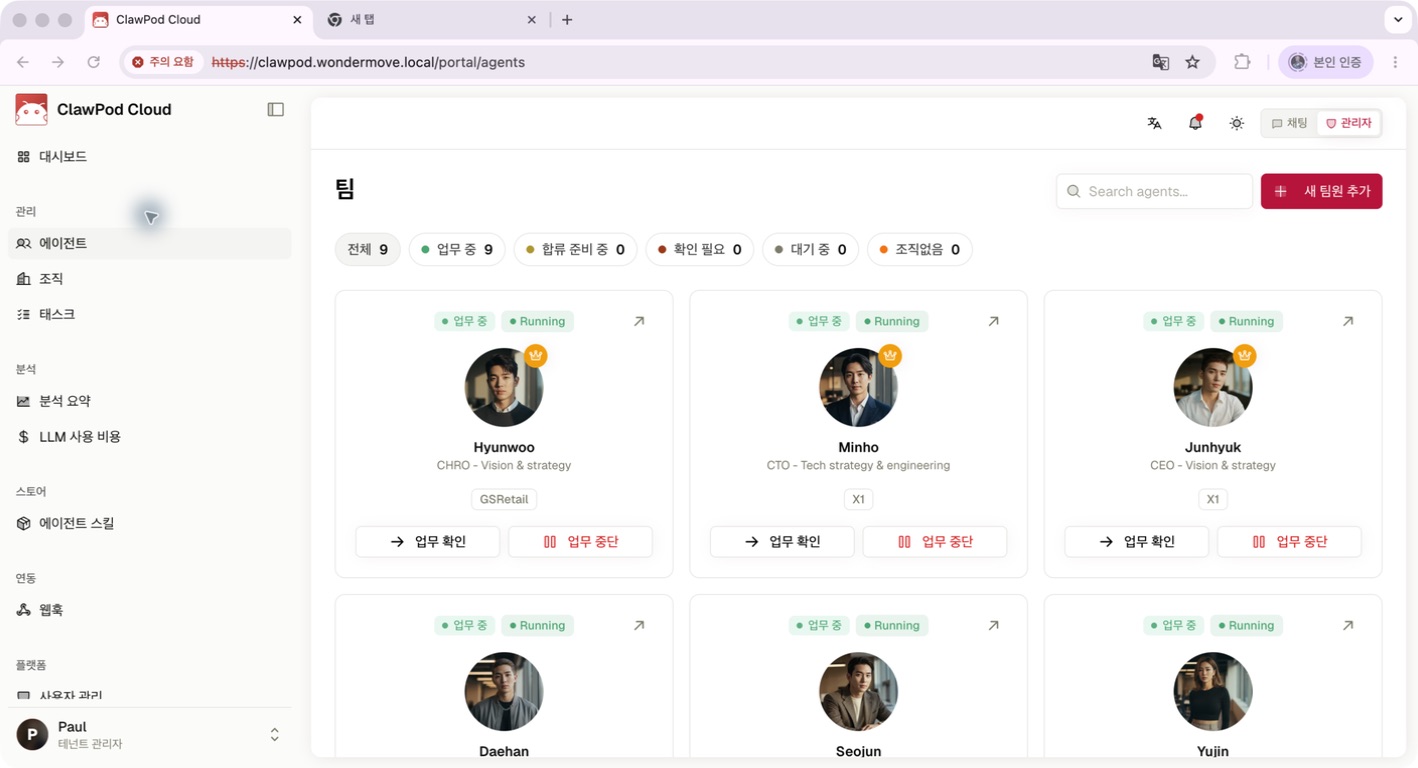
The Agent list shows the current roster and the entry point for adding an Agent. This original Cloud Manual V4.8.3 reference may differ from your UI by release, environment, plan, organization configuration, role, and permission.
2. Confirm the AI credential your Agent will use
A Credential profile holds a sensitive value that lets an Agent connect to a model provider or local LLM. It is not a personal password vault or a general-purpose secret store.
During new-workspace onboarding, choose the provider offered by the flow and place the provider-issued API key only in its designated field. In an existing organization, check whether the intended credential is selectable when you create the Agent. If it is absent, ask an administrator to confirm both the profile and your permission to use it.
Keep these boundaries in place:
- Never paste API keys, access tokens, or recovery codes into Chat, documents, workspace files, screenshots, or support requests.
- The provider, not ClawPod, issues its API key.
- A successful connection test does not prove that an Agent runtime call will work. Test again with a small, non-sensitive request after creating the Agent.
- If exposure is suspected, replace the ClawPod profile and separately revoke the old key in the provider console.
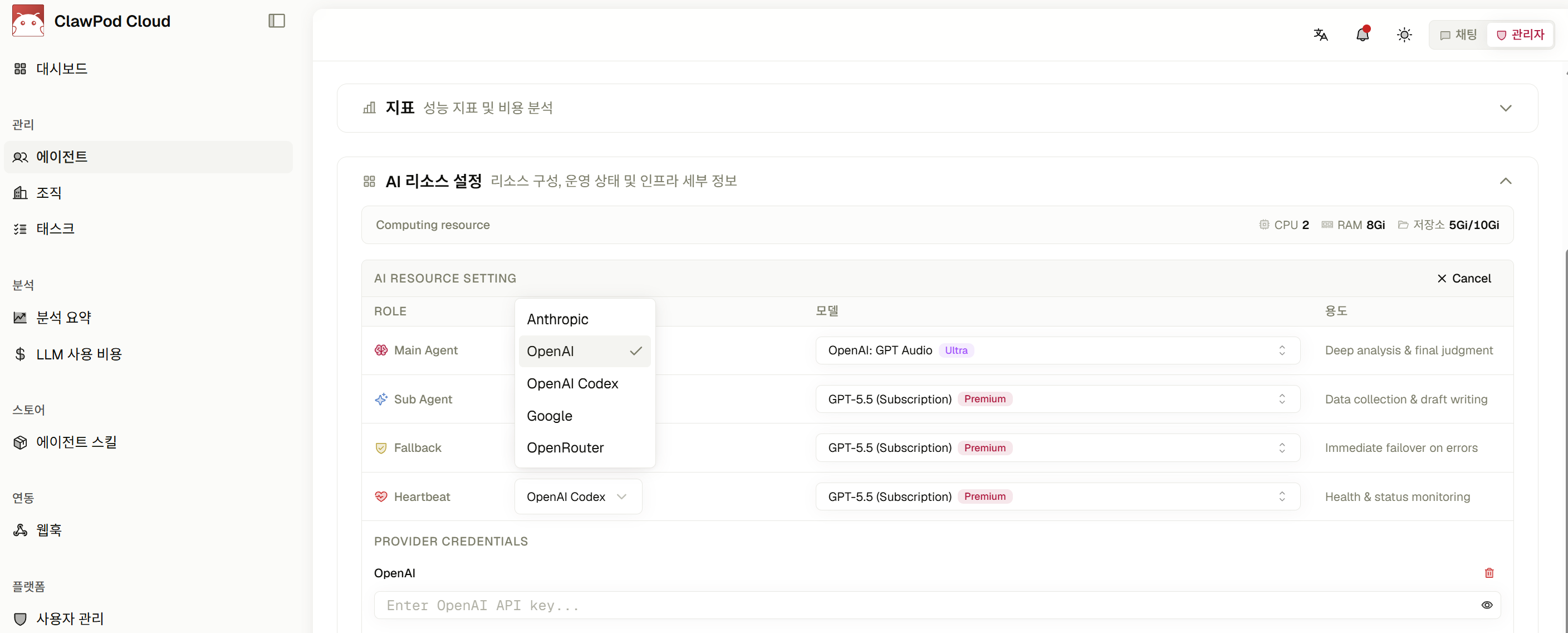
This configuration area is where a model and credential are selected for an Agent. It is an original Cloud Manual V4.8.3 reference, and available choices vary by environment, organization configuration, and permission. Never preserve a real secret in a screenshot or document.
Success means the intended model and credential are selectable for the Agent without exposing the raw secret in a screen or record.
3. Create a first Agent you can describe in one sentence
A focused Agent is easier to test than an all-purpose assistant. Here is a safe starter definition:
- Name: Customer Support Helper
- Role: Classify customer questions and draft responses.
- Do: summarize the question, identify missing information, and draft a reply.
- Do not: approve refunds, promise compensation, infer personal data, or repeat sensitive data.
- Reporting style: separate confirmed facts from items that still need checking.
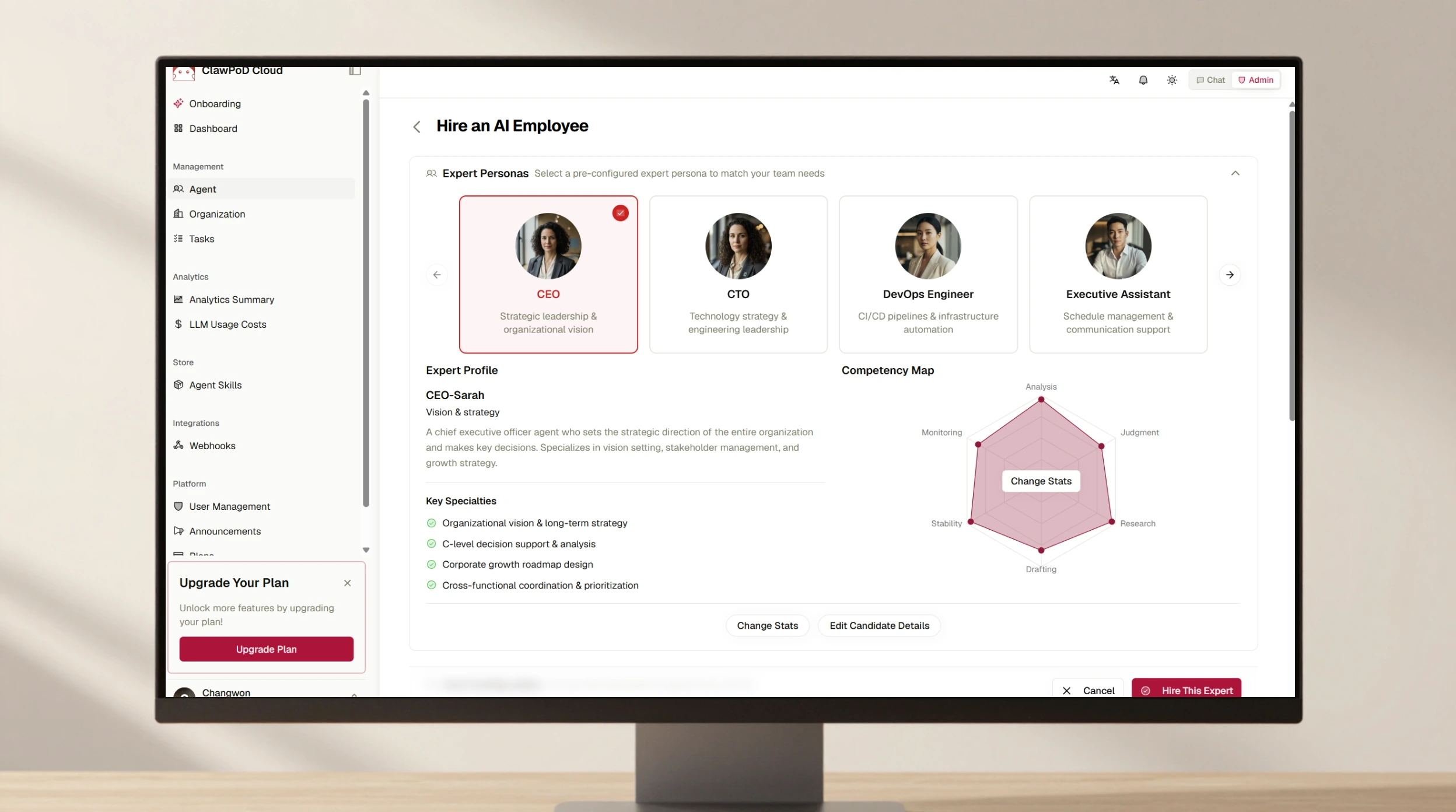
Open Agents in the Portal and select Add New Team Member. Set the name and role, choose a preset or configure the role directly, then select the model and credential. Review the baseline instructions for responsibilities, tone, and prohibited actions. Finish with Hire This Expert, followed by Confirm and Create in the review dialog.
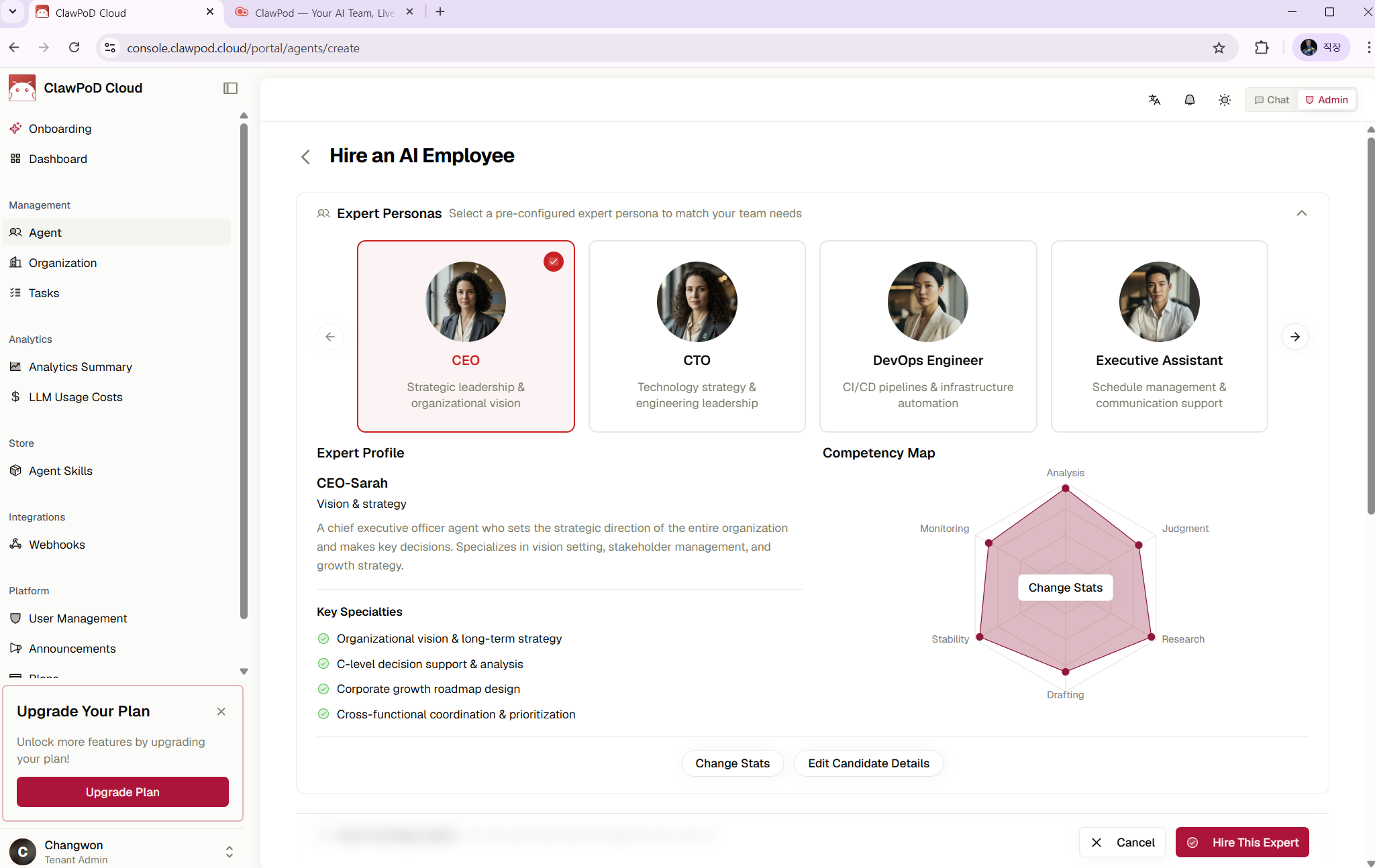
The creation flow presents role selection and a confirmation action. This original Cloud Manual V4.8.3 reference may differ by release, environment, and Agent-creation permission.
Success means the new Agent appears in the Agents list and its detail view shows a valid status and the expected baseline configuration.
| Symptom | Check first |
|---|---|
| Add New Team Member is missing | Agent-creation permission |
| No model or credential can be selected | Organization credential and usage permission |
| The Agent exists but cannot chat | Agent status and organization connection settings |
4. Create a dedicated Room with one Agent
Open Chat in the Portal and create a Room with a clear name such as Customer Support Helper Test. Add only the Agent you just created, then verify the selected Room and its participant list.
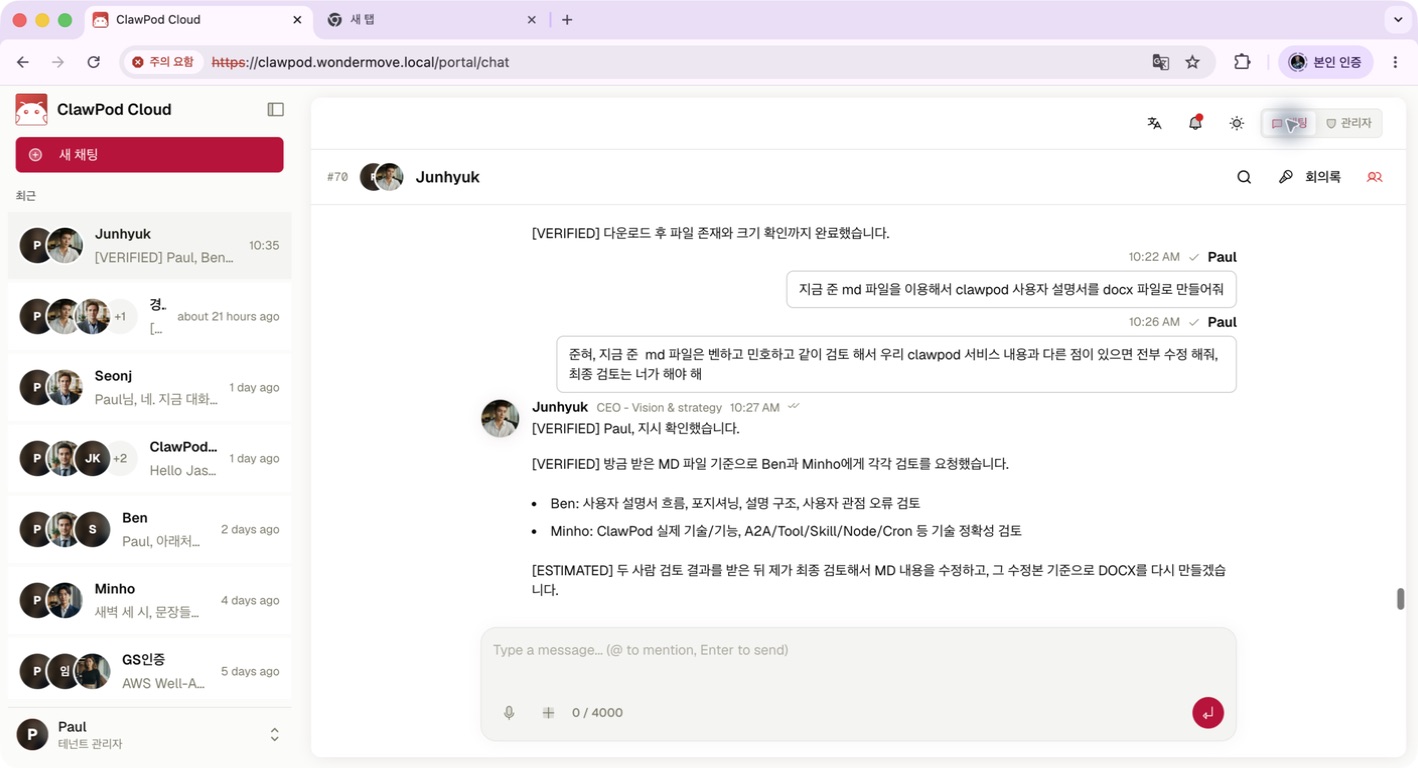
A dedicated Room provides the conversation area and composer for a first Agent request. This original Cloud Manual V4.8.3 reference may differ by environment, organization configuration, and permission.
Every participating Agent can receive and process Room messages. A mention clarifies intent, but it does not enforce exclusive routing to one Agent. A dedicated one-Agent Room removes that ambiguity from your first test.
5. Send a small request with observable completion criteria
Your first prompt should state the goal, input, output, constraints, and definition of done. For example:
Prepare the following question for a customer-support teammate.
Question: “My payment went through, but the order status has not changed.”
Output: (1) issue summary, (2) information still needed, and (3) a draft reply.
Constraints: do not approve a refund or compensation, and do not infer personal data. Done when: confirmed facts are clearly separated from information that still needs checking.
Sending the message is not completion. Verify all three outcomes:
- Your message appears in the Room.
- The intended Agent shows a response or processing state.
- The result has the three requested sections and respects the refund, compensation, and privacy limits.
If no response arrives, check the Agent status, credential binding, provider account quota, and network state in that order. After changing a connection, test again in the same safe Room with non-sensitive input. If you need support, share the time and error text, never the secret.
Improve only what repeats after the first success
Once the request succeeds, resist the urge to make the Agent complex immediately. Add only the patterns that recur in real work: preferred output structure, approval boundaries, how to ask for missing information, and how to distinguish facts from assumptions.
Your first setup is complete when:
- account and organization access work;
- the Agent can use the intended model and credential; and
- the dedicated Room produces a response that meets the requested format and safety constraints.
From there, expand one concern at a time. Multi-Agent collaboration, organization design, automation, and cost controls are better treated as separate next steps.
Sources
- ClawPod Guide, Getting started with ClawPod, the basic path from account access to a first conversation.
- ClawPod Guide, Signup, login, and account recovery, direct signup, organization invitation, and recovery.
- ClawPod Guide, Complete new-workspace onboarding, the separate onboarding path for a new workspace.
- ClawPod Guide, Create your first Agent, role, model, credential, creation, and completion checks.
- ClawPod Guide, Manage AI keys and credentials, provider connections and secret-handling boundaries.
- ClawPod Guide, Work with Agents in a Chat Room, dedicated Rooms, mention behavior, and completion checks.